
Use this cable to configure a Cisco router through the Console port at the router. This cable is also suitable to be used with Sun T2000.
 9 PIN D-SUB FEMALE to the Computer
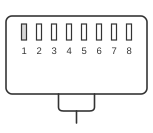 RJ45 MALE CONNECTOR to the Cisco router
The Cisco console adapter connects a PC’s DB-9 serial port to a Cisco router or switch console port via an RJ-45 rollover cable, carrying asynchronous RS-232 (TIA-232-F) signals. Cisco introduced this RJ-45 console scheme on its routers in the 1990s, and the same wiring was subsequently adopted by Sun Microsystems (Netra/SunFire LOM ports), Juniper, and Lantronix terminal servers. The grey RJ-45-to-DB-9 adapter (Cisco part 74-0495-01, also known as CFDTE91) is used in conjunction with a blue flat rollover cable (CAB-500RJ) that reverses all eight conductors end-to-end. Default console settings are 9600 baud, 8 data bits, no parity, 1 stop bit, and no flow control; the console port does not support hardware RTS/CTS flow control.
| RJ45 | DB9 |
|---|---|
| RTS | 1 |
| DTR | 2 |
| TXD | 3 |
| GND | 4 |
| GND | 5 |
| RXD | 6 |
| DSR | 7 |
| CTS | 8 |
Signals
- RTS — Request To Send; output from the Cisco console port (DTE), presented on DB-9 pin 1 (DCD position) via the adapter
- DTR — Data Terminal Ready; output from the Cisco console port, mapped to DB-9 pin 6 (DSR position)
- TXD — Transmit Data; serial data output from the Cisco device, received as RxD by the PC on DB-9 pin 2
- GND — Signal Ground; two RJ-45 pins (4 and 5) are both signal ground, both mapped to DB-9 pin 5
- RXD — Receive Data; serial data input to the Cisco device, transmitted as TxD by the PC on DB-9 pin 3
- DSR — Data Set Ready; input to the Cisco console port, mapped to DB-9 pin 7 (RTS position)
- CTS — Clear To Send; input to the Cisco console port, mapped to DB-9 pin 8 (CTS position)
Notes
- The rollover cable (CAB-500RJ) reverses all eight conductors: RJ-45 pin 1 connects to pin 8 at the far end, pin 2 to pin 7, and so on. This null-modem arrangement allows a DTE console port to connect directly to a PC without an additional null-modem adapter.
- The adapter remaps signals to non-standard DB-9 positions: DB-9 pin 1 carries RTS (not DCD), pin 2 carries DTR (not RxD), and so on. Standard PC serial port drivers must be configured accordingly; most terminal emulators work correctly with hardware flow control disabled.
- The console port does NOT support hardware RTS/CTS flow control. The AUX port on Cisco routers does support hardware flow control and modem control and uses the same RJ-45 connector and pinout.
- Compatible devices using the same Cisco wiring scheme include Sun Netra and SunFire LOM console ports, Juniper J-series routers, Nokia VPN gateways, and Lantronix SLC terminal servers.