
IBM introduced the PS/2 6-pin mini-DIN connector with the Personal System/2 line in 1987 as a replacement for the 5-pin DIN AT keyboard connector. Certain ThinkPad models — including the 220, 560, 600, T20–T23, and A-series — expose a single combo PS/2 port that carries both keyboard and mouse signals simultaneously by utilising the two pins (2 and 6) that are otherwise unconnected in a standard PS/2 port. A Y-splitter cable separates the two channels into individual keyboard and mouse female connectors, allowing both peripherals to be used at the same time. The ThinkPad convention routes mouse signals straight-through on pins 1 and 5, while keyboard data and clock are carried on the reserved pins 2 and 6 of the host combo port.
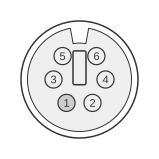 6 PIN MINI-DIN MALE (PS/2 STYLE) to the Computer
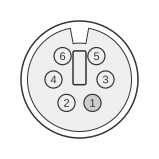 6 PIN MINI-DIN FEMALE (PS/2 STYLE) to the Keyboard
6 PIN MINI-DIN FEMALE (PS/2 STYLE) to the Mouse
| Computer | Keyboard | Mouse |
|---|---|---|
| 1 | 2 | - |
| 2 | - | 1,2 |
| 3 | 3 | 3 |
| 4 | 4 | 4 |
| 5 | 6 | 5 |
| 6 | - | 6 |
Signals
- Computer pin 1 (Data) — mouse data; routed straight-through to the mouse female connector
- Computer pin 2 (Reserved) — carries keyboard data in the ThinkPad combo-port implementation; appears on pins 1 and 2 of the mouse female due to combo-port loopback
- Computer pin 3 (Ground) — common ground; connected to both downstream connectors
- Computer pin 4 (+5 Vdc) — supply voltage (+4.5 V to +5.5 V); split between both downstream connectors
- Computer pin 5 (Clock) — mouse clock; routed straight-through to the mouse female connector
- Computer pin 6 (Reserved) — carries keyboard clock in the ThinkPad combo-port implementation
Notes
- The host port must have hardware support for the combo mode; not all single PS/2 ports support simultaneous keyboard and mouse operation through this scheme.
- Dell uses the opposite convention to ThinkPad: mouse is routed to the reserved pins (2 and 6) and keyboard is straight-through on pins 1 and 5. A Dell splitter can be used with a ThinkPad if the keyboard and mouse peripherals are swapped.
- Data and Clock lines are open-collector, pulled to +5 Vdc via pull-up resistors; Vcc = +4.5 V to +5.5 V; clock frequency 10–16.7 kHz.
- Current ThinkPad models no longer expose a PS/2 bus, even through docking options.