
Olympus CAMEDIA C- and D-series digital still cameras from the late 1990s and early 2000s include a proprietary RS-232C serial interface for transferring images to a PC. The camera-side connector is a 2.5 mm sub-mini stereo (TRS) jack, labelled “Communications connector” on the camera body and accessed beneath a rubber cover. The OEM cable — the Olympus DCS-3 — carries only three conductors: Receive Data, Transmit Data, and Signal Ground, terminating in a DB9-F plug compatible with the COM1/COM2 serial port of IBM PC/AT-compatible computers running Windows 95, 98, or NT 4.0. Macintosh users required a conversion connector to reach the Mac 8-pin mini-DIN serial port.
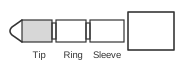 3 pin stereo plug connector at the serial cable
 9 pin D-SUB female connector at the computer’s cable
Only three signal wires are needed in the computer cable.
| Camera cable Pin | Signal | Computer DE-9 cable pin |
|---|---|---|
| 1 | Receive data (RxD) | Connect to DB9 pin 2 |
| 2 | Signal ground (Gnd) | Connect to DB9 pin 5 |
| 3 | Transmit data (TxD) | Connect to DB9 pin 3 |
You may short together pin 4 (DTR) to pin 6 (DSR) and pin 7 (RTS) to pin 8 (CTS), if needed.
Notes
The 2.5 mm stereo plug is a standard TRS (tip–ring–sleeve) sub-mini jack. Tip carries RxD (pin 1), ring carries Signal Ground (pin 2), and sleeve carries TxD (pin 3). The camera presents logic-level signals via an internal level-shifter; RS-232C voltages are not present at the camera connector. Handshaking lines DTR/DSR and RTS/CTS are not used by the camera; loop them together on the DB9 if the CAMEDIA Master software or a third-party transfer utility requires them.
Signals
- RxD — Receive Data from computer to camera (DB9 pin 2); tip of the 2.5 mm plug
- Gnd — Signal ground common to both devices (DB9 pin 5); ring of the 2.5 mm plug
- TxD — Transmit Data from camera to computer (DB9 pin 3); sleeve of the 2.5 mm plug