
camera connector or camera cable scheme
UNKNOWN connector at the camera
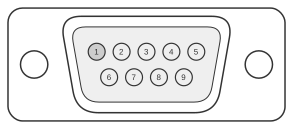 9 pin D-SUB male connector at the computer
| PC Pin name | PC Pin | Direction | digital cameras AGFA and Olympus Pin | digital cameras AGFA and Olympus Pin name | Description |
|---|---|---|---|---|---|
| 1 | - | ||||
| 2 | OUT | 1 | left | ||
| 3 | IN | 3 | ground | ||
| 4 | - | ||||
| 5 | IN/OUT | 2 | right | ||
| 6 | - | ||||
| 7 | - | ||||
| 8 | - | ||||
| 9 | - |
Agfa ePhoto and Olympus CAMEDIA cameras from the late 1990s use a proprietary 2.5 mm sub-mini stereo (TRS) plug on the camera body, labelled “Communications connector” on Olympus models, to carry a three-wire RS-232C serial link for image transfer to a PC. The PC side terminates in a DB9-F connector, connecting to a standard COM port running Windows 95/98/NT 4.0 or the Macintosh serial port via a separate adaptor. Only three conductors are used: TxD, RxD, and signal ground; hardware handshaking lines are absent from the cable and, where required by software, are looped on the DB9. Agfa ePhoto cameras share the same cable as the Olympus DCS-3 accessory, confirming a common physical interface across both brands.
Notes
- pin 5 on com must be also connected to shield
- The camera-side connector is a 2.5 mm sub-mini three-conductor (TRS) stereo plug: tip = RxD (DB9 pin 2), ring = GND (DB9 pin 5), sleeve = TxD (DB9 pin 3).
- The OEM cable for Olympus CAMEDIA models (C-2000 Zoom, C-2020 Zoom, C-2500L, C-3000 Zoom) is the Olympus DCS-3, a 6 ft cable with ferrite core and gold-plated connectors; the Agfa ePhoto 780C cable is interchangeable with this part.
- Direct USB connection is not supported by these models; RS-232C is the only transfer interface.
- If the host software requires hardware handshaking, loop DTR (DB9 pin 4) to DSR (pin 6) and RTS (pin 7) to CTS (pin 8) on the DB9 end.