
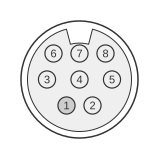
 8 pin mini-DIN male connector at the camera
 9 pin D-SUB female connector at the computer
Kodak DC-series digital cameras from the mid-1990s to early 2000s used an 8-pin mini-DIN connector on the camera body to provide an RS-232 serial link for transferring images to a computer. The interface was present on the DC40, DC50, DC120, DC240, DC280, DC3400, and DC5000, as well as OEM variants sold under the RCA, Vivitar, and Rollei brands. A serial cable was included as standard with each camera; the PC side terminates in a DB9-F connector (a 25-pin adapter was also supplied for older systems). Only three signal lines are used — TxD, RxD, and GND — with no hardware handshaking in the cable itself.
| Minidin 8 Pin | DB9 Pin | Func |
|---|---|---|
| 1,2,6 | not connected | |
| 3 | 2 | RxD |
| 4,7,8 | 5 | GND, shorted in cable |
| 5 | 3 | TxD |
Alternative pinout
| Minidin 8 Pin | DB9 Pin |
|---|---|
| 1 | - |
| 2 | - |
| 3 | 1 |
| 4 | 3 |
| 5 | 2 |
| 6 | - |
| 7 | 4 |
| 8 | 1 |
Notes
- Pins 5, 6, 7, and 8 of the DB9 are joined together, whilst pin 9 is not connected.
- The 8-pin mini-DIN shell is physically identical to the classic Macintosh DIN-8 serial connector. A dedicated Macintosh serial cable (or adapter plug) was supplied with the camera for connection to the Mac modem or printer port.
- The camera’s serial port is accessed by opening or lifting a rubber cover on the side of the camera body; the connector is keyed, so alignment of the notches is required before insertion.
- Software handshaking lines (DTR/DSR, RTS/CTS) are not wired in the cable; if the Kodak image-transfer software requires them, they should be looped on the DB9 end.
Signals
- RxD — Receive data; carries data from the PC to the camera (mini-DIN pin 3 → DB9 pin 2).
- TxD — Transmit data; carries data from the camera to the PC (mini-DIN pin 5 → DB9 pin 3).
- GND — Signal ground; mini-DIN pins 4, 7, and 8 are bonded together in the cable and connect to DB9 pin 5.
- Pins 1, 2, 6 — Not connected in the serial cable.