
The Norton/PassMark parallel port loopback plug is a passive DB-25 male connector that seats directly on the IBM PC parallel port socket. It routes five data output lines (pins 2–6, carrying Data Bits 0–4) back to the five status input lines (pins 15, 13, 12, 10, and 11), enabling diagnostic software to verify the port by transmitting a test pattern and confirming the values read back through the status register. The design was popularised by Norton Diagnostics and later adopted identically by PassMark Software for use with BurnInTest Professional; the wiring has remained unchanged since at least BurnInTest v2.0. The IBM PC parallel interface follows the IEEE 1284-A standard, using a DB-25 connector with eight data outputs on pins 2–9, four control outputs, and five status inputs; only the first five data bits (pins 2–6) are exploited in this loopback because the status register provides exactly five readable input bits. ECP or EPP BIOS mode is required to run the PassMark loopback test; the older SPP/bidirectional BIOS mode is not supported.
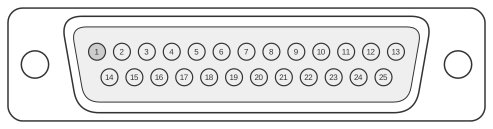 25 PIN D-SUB MALE Connector
| Name | Pin | Pin | Name |
|---|---|---|---|
| Data Bit 0 | 2 | 15 | Error |
| Data Bit 1 | 3 | 13 | Select |
| Data Bit 2 | 4 | 12 | Paper Out |
| Data Bit 3 | 5 | 10 | Acknowledge |
| Data Bit 4 | 6 | 11 | Busy |
Signals
- Data Bit 0 (pin 2) — data output wired to Error* status input (pin 15)
- Data Bit 1 (pin 3) — data output wired to Select status input (pin 13)
- Data Bit 2 (pin 4) — data output wired to Paper Out status input (pin 12)
- Data Bit 3 (pin 5) — data output wired to Acknowledge* status input (pin 10)
- Data Bit 4 (pin 6) — data output wired to Busy status input (pin 11)
Notes
- The plug is entirely passive: output pins are wired directly to input pins with no active electronics.
- Data bits 5–7 (pins 7–9) are not connected; the parallel port status register provides only five readable input bits, so higher data lines cannot be read back without active circuitry.
- The connector is DB-25 male (PassMark product code PM013) and seats directly on the PC parallel port socket; a straight-through cable may be used if the plug cannot connect directly.
- ECP or EPP BIOS mode must be selected in firmware; standard SPP (bidirectional) mode is not supported by PassMark BurnInTest.
- Compatible with Windows 98 through Windows 11 and Linux when used with BurnInTest Professional v2.0 or later.
References
- PassMark Hardware — Serial (RS232) and Parallel Loopback Plugs Technical Specifications
- BurnInTest V9.0 Users Guide (March 2018)
- BurnInTest V11 Users Guide (October 2024)
- Serial & Parallel Diagnostic Loopback Plugs, Revision 1.01 — David D. Scribner
- Application Note 062: IEEE 1284 – Updating the PC Parallel Port, National Instruments Corporation, October 1995