
The Macintosh Plus and all subsequent beige-era Macintosh models use a mini-DIN-8 serial port driven by the Zilog Z8530 SCC IC, employing RS-422 balanced-differential signalling rather than RS-232. This cable connects that port to a standard DB-25 RS-232 modem without asserting DTR: instead of routing the Mac’s HSKo handshake output to both RTS and DTR at the modem end (as the “with DTR” variant does), this cable leaves DSR and DTR jumpered together at the modem end so the modem remains active regardless of Mac-side handshake state. The negative legs of the RS-422 transmit and receive pairs (TxD− and RxD−) carry the data signals across to the modem’s single-ended RS-232 lines, and pins 4 and 8 of the mini-DIN-8 (GND and RxD+) are tied together and connected to DB-25 signal ground.
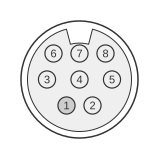 8 PIN MINI-DIN MALE to the Computer
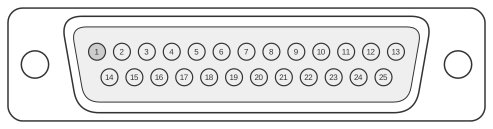 25 PIN D-SUB MALE to the Modem
| Signal | mini-DIN8 Pin | Dir | DB 25 Pin | Signal |
|---|---|---|---|---|
| HSKo | 1 | OUT | 4 | RTS |
| HSKi | 2 | IN | 5 | CTS |
| TxD- | 3 | OUT | 2 | TxD |
| RxD- | 5 | IN | 3 | RxD |
| GND+RxD+ | 4+8 | - | 7 | GND |
| 6+20 | DSR+DTR |
Signals
- HSKo — Handshake Out; driven by the Z8530 SCC’s DTR output; used here solely as RTS to the modem
- HSKi — Handshake In / external clock input; connected to modem CTS
- TxD− — Transmit Data, negative leg of the RS-422 balanced pair; drives modem TxD
- RxD− — Receive Data, negative leg of the RS-422 balanced pair; receives modem RxD
- GND+RxD+ — mini-DIN-8 pins 4 (signal ground) and 8 (RxD+, positive receive leg) tied together and wired to DB-25 signal ground (pin 7)
- DSR+DTR — DB-25 pins 6 (DSR) and 20 (DTR) jumpered together at the modem end; keeps the modem in a ready state without requiring an explicit DTR assertion from the Mac
Notes
The Mac serial port uses RS-422 balanced-differential signalling; the modem uses single-ended RS-232. Only the negative (−) leg of each differential pair is used for data, which is standard practice for this type of adapter. The “without DTR” configuration is appropriate when the modem does not require a true DTR toggle to connect or disconnect calls. For modems that require DTR to be raised before dialling, the “with DTR” variant (which routes HSKo to both RTS and DTR) should be used instead.
References
- Guide to the Macintosh Family Hardware, Second Edition — Apple Computer Inc. / Addison-Wesley, 1990