
Connector at the Bottom of the PDA
Bottom of the PDA
The Handspring Visor Deluxe PDA uses an 8-pin proprietary dock connector located at the bottom of the unit. This connector carries 3.3 V serial data, USB D+ and D− lines, a HotSync interrupt signal, a keyboard-detect line, and a cradle-supplied voltage rail (VDock) used to charge Springboard module batteries. The pinout layout described here is specific to the Visor Deluxe, with pin 1 on the left when the device lies screen-down with the connector towards you. Only the eight pins listed below are documented.
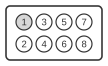
| Pin | Name | Direction | Description |
|---|---|---|---|
| 1 | RX Data | OUT | 3.3V input to Visor Deluxe serial port |
| 2 | Keyboard Detect | OUT | 3.3V input to notify Visor Deluxe of presence of external keyboard |
| 3 | Hotsync interrupt | OUT | 3.3V input to notify Visor Deluxe that Hotsync button on cradle was pushed |
| 4 | Ground | - | Ground |
| 5 | USB + Data | IN/OUT | USB D+ line |
| 6 | USB - Data | IN/OUT | USB D- line |
| 7 | VDock | - | Voltage from cradle. Connects internally to some Springboard modules to recharge onboard batteries. |
| 8 | TX Data | IN | 3.3V output from Visor Deluxe serial port |
Notes
Pin numbers refer to the connector on the device; the direction column reflects signal flow as seen from the Visor Deluxe.