
The Universal Serial Bus (USB) is a serial bus standard for connecting peripherals to a computer, carrying both data and power over a single cable with hot-plug (“plug-and-play”) support. It was developed in the mid-1990s by a group of companies including Compaq, Digital Equipment Corporation, IBM, Intel, Microsoft, NEC and Nortel, and quickly became the standard peripheral interface on personal computers. The original Type-A and Type-B connectors shown here have four contacts — power, ground and a differential data pair (D+/D-); later revisions (USB 3.x and USB-C) add further contacts and much higher speeds.
USB Connectors
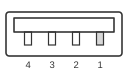 4 Pin Male “A” Connector on the cable
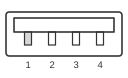 4 Pin Female “A” Connector on the computer
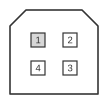 4 Pin “B” Male Connector on cable
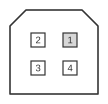 4 Pin “B” Female Connector on computer
| Pin | Name | Description | Color |
|---|---|---|---|
| 1 | VCC | +5 VDC | Red |
| 2 | D- | Data - | White |
| 3 | D+ | Data + | Green |
| 4 | GND | Ground | Black |
mini-USB Connectors
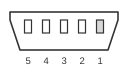 5 pin mini-USB plug connector at the peripherals.
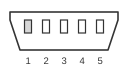 5 pin mini-USB jack connector at the controller.
| Pin | Name | Description | Color |
|---|---|---|---|
| 1 | VCC | +5 VDC | Red |
| 2 | D- | Data - | White |
| 3 | D+ | Data + | Green |
| X | ID | May be N/C, GND or used as an attached device presence indicator (shorted to GND with resistor). | |
| 4 | GND | Ground | Black |
Mainboard USB Connector
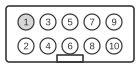 10 pin IDC male connector at the motherboard
| Pin | Name | Description | Port |
|---|---|---|---|
| 1 | VCC | +5 VDC | USB 1 |
| 3 | D0- | Data - | |
| 5 | D0+ | Data + | |
| 7 | GND | Ground | |
| 9 | key | ||
| 2 | VCC | +5 VDC | USB 2 |
| 4 | D1- | Data - | |
| 6 | D1+ | Data + | |
| 8 | GND | Ground | |
| 10 | N/C |
Features
- True Plug’n’Play.
- Hot plug and unplug
- Low cost
- Ease of use
- 127 physical devices
- Low cost cables and connectors
Uses
- Keyboards, mice, joysticks, modems
Bandwidth
- Full speed: 12 Mbps speed (requires shielded cable)
- Low speed: 1.5 Mbps speed (non-shielded cable)
Definitions
USB Host = The computer, only one host per USB system. USB Device = A hub or a Function.
Power usage
Bus-powered hubs: Draw max 100 mA at power-up and 500 mA normally. Self-powered hubs: Draw max 100 mA, must supply 500 mA to each port. Low-power, bus-powered functions: Draw max 100 mA. High-power, bus-powered functions: Draw max 500 mA. Self-powered functions: Draw max 100 mA. Suspended device: Max 0.5 mA
Voltage
- Supplied voltage by a host or a powered hub ports is between 4.75 V and 5.25 V.
- Maximum voltage drop for bus-powered hubs is 0.35 V from it’s host or hub to the hubs output port.
- All hubs and functions must be able to send configuration data at 4.4 V, but only low-power functions need to be working at this voltage.
- Normal operational voltage for functions is minimum 4.75 V.
Shielding
Shield should only be connected to Ground at the host. No device should connect Shield to Ground.
Cable
Shielded: Data: 28 AWG twisted Power: 28 AWG - 20 AWG non-twisted
Non-shielded: Data: 28 AWG non-twisted Power: 28 AWG - 20 AWG non-twisted
| Power Gauge | Max length |
|---|---|
| 28 | 0.81 m |
| 26 | 1.31 m |
| 24 | 2.08 m |
| 22 | 3.33 m |
| 20 | 5.00 m |
USB Charger
To force charging of your iPod, PSP or any USB device, you have to force high the levels of the data pins 2 (D-) and 3 (D+) by connecting them to a +5V using a 10KOhm resistor.